
You can reset your password while logged into your MCM account:
If the Client is using Office365/Microsoft365, they must reach out to their IT department for resetting their AD (Active Directory) credentials.
-
These clients use their AD Credentials for logging into MCM.
If Logging in with the Local Account option:
-
Navigate to the top right hand corner of the screen and click on Profile.
-
Select Change Password in the dropdown.
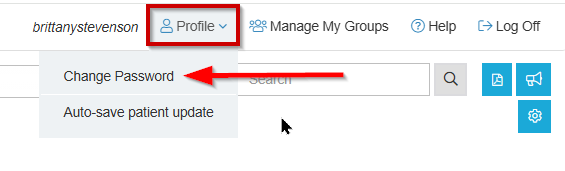
-
Follow the link and enter email address to have password reset email delivered.
Forgotten Password:
-
At the login page, select Local Account
-
Select “Forgot your password?”
-
Enter in your work email, and you will be sent an invitation link for updating your password.
If you happen to forget your password or don’t receive an email, please contact support at: 855-424-3914 or service@managedcaremaster.com. Accounts are disabled due to inactivity after 90 days.