
The Alert Details reports are designed to give you information around alerts by facility, patient, status and time. There are two separate reports which change the display and output of the data.
You cannot adjust or take action on alerts from the Alert Details reports. Please see Reviewing & Resolving Alerts
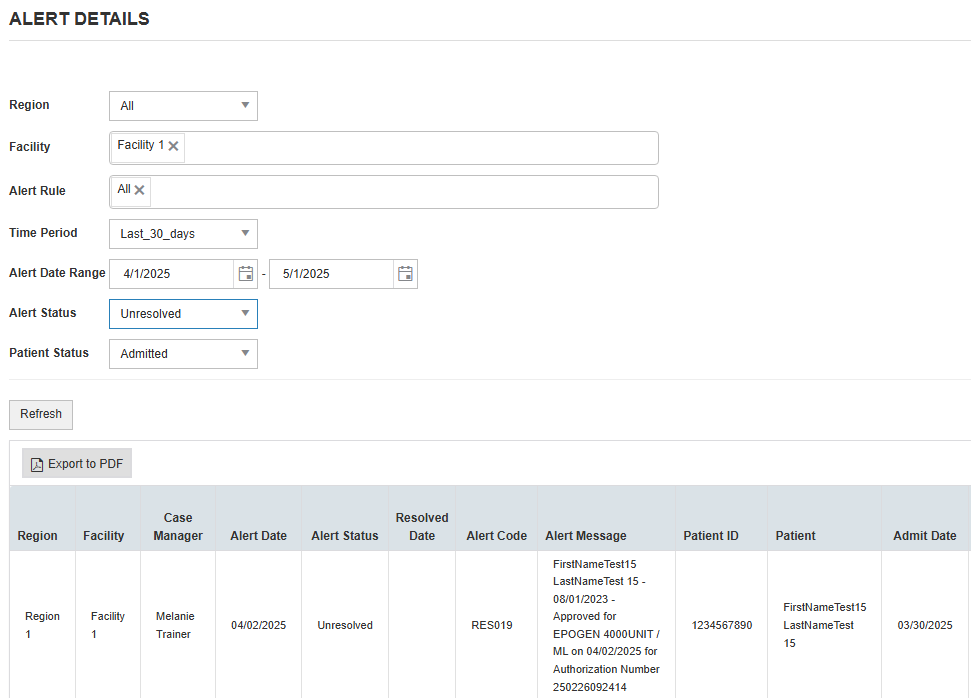
Alert Details (standard)
Retrieves Alert information and presents it in a table for easy web viewing and allows for an export to PDF.
|
Region |
Select which regions to include or All |
|
Facility |
Select which facilities to include or All |
|
Alert Rule |
Select specific Alert Rules to include or All |
|
Time Period |
Preset time periods you can choose from OR |
|
Alert Date Range |
Manually adjust date range. Will populate off of Time Period, but you can adjust and will drive report logic |
|
Alert Status |
Select specific Alert Status to include or All. Defaults to Unresolved. |
|
Patient Status |
Allows to select either Admitted, Discharged, or All |
Alert Details xlsx
Same as above but provides for a downloadable Excel format.