Tutorial
The Authorizations tile contains and allows editing of patient authorizations for the individual stay selected. Authorizations can be entered manually or can be automated to pull over from an EMR system.
Regardless of manual entry or EMR source update, a complete authorization including Level of Care for level based insurance plans must be entered for the majority of MCM managed care functionality to work.
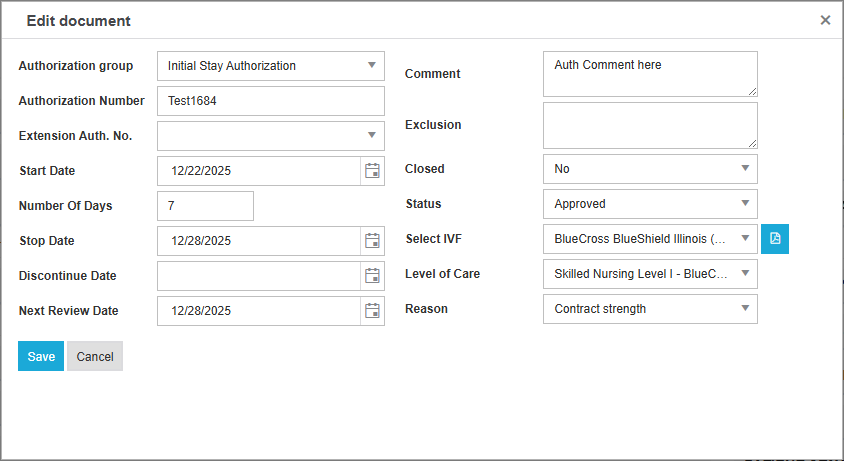
Upon clicking Add (top, orange) or Edit (ellipsis on existing record), you have various fields to update.
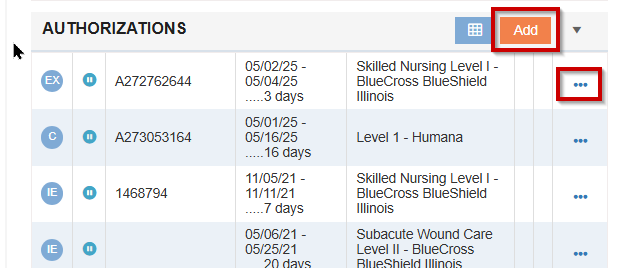
Authorizations are date driven, so multiple records can exist for the same stay under the same Authorization.
To schedule an update to the Home Calendar:
-
Navigate to the Next Review Date dropdown
-
Set a date you would like to schedule, and click save
-
Navigate to the ellipsis and select “Schedule next patient update on DATE”, and click OK at the top of the screen.
💡 You will be able to confirm the date is scheduled by checking the Home Calendar.
|
Authorization Group |
Various options to indicate what type of Authorization. Typically starts with Initial Stay Authorization for the first initial stay date range, then transitions to other Authorization Group types. |
|
Authorization Number |
Authorization code assigned to the patient/stay. |
|
Extension Auth. No. |
Drop down that can be used subsequent to the Initial Stay Authorization to select an existing Authorization. |
|
|
The start of the authorization period. Required for some functionality to work in MCM. |
|
Number Of Days |
Length of authorization period. |
|
Stop Date |
End date of authorization period. Will auto populate if Number of Days is entered. |
|
Discontinue Date |
Date when services were discontinued if prior to the stop date. |
|
Next Review Date |
If known, a date when a future review will be required to obtain extended authorization. |
|
Comment |
Free form field to allow comments useful to the user or team. |
|
Closed |
Indication if the authorization has been closed and is no longer valid. |
|
Status |
Status of the Authorization. |
|
|
Drop down that allows selection of available payer plans that have been added to the patient stay in the Insurance tile. Required for some functionality to work in MCM. |
|
|
Drop down for specified IVF above with available levels of care. Required for some functionality to work in MCM. |
|
HIPPS Code |
Free form field for entering HIPPS Code for PDPM based plans. |
|
Reason |
The reason that the patient’s “level” did not increase. |